[vue/js] Vue 의 Computed 속성
Vue의 html에 js 변수 매핑하기 v-bind
해당 포스팅은 Vue 의 공식문서를 참조하여 작성하였습니다.

만약 이런 경우가 있다고 가정해 봅시다. First Name과 Last Name을 서로 더하여 html 에 표현한다고 생각해봅시다. 그럼 js 변수 2개를 먼저 만들고, html에 mustache 를 사용하여 두 문자열을 더하는 식으로 작성해야 합니다.
<script setup lang="ts">
 const firstname = ref('Dong Woo');
 const lastname = ref('Kim');
</script>

<template>
    <h1></h1>
</template>

<style scoped></style>
지금은 js 변수가 2개밖에 없어서 괜찮지만, 많은 연산을 해야한다면, html 안에 들어가는 코드가 길어져서 보기가 힘들어 집니다.
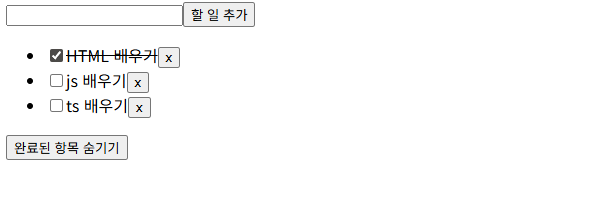
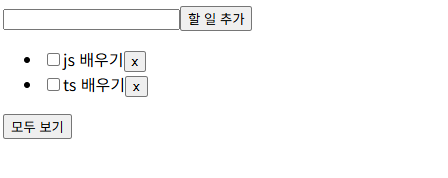
따라서, 두가지의 반응형 변수를 계산할 수 있는 기능이 필요합니다. vue에서는 computed()를 사용하여 해결합니다. computed()는 두가지 이상의 반응형 변수를 계산하여 반응형 변수가 바뀔 때 마다 다시 연산을 수행하여 결과를 반환해주는 함수 입니다. 간단한 todo list 기능을 만들어 예제로 표현하였습니다.
할일이 완성되면, line-through 효과를 넣어주고, 아래에 있는 Hide completed를 토글하면, 완료된 항목은 사라지게 해야 합니다.
그렇다면, 할일이 다 되었는가? 에 대한 변수와 완료한 목록을 리스트에서 안보이게 할것인가? 에 대한 속성들 2가지가 필요합니다. 해당 반응형 속성들을 계산할 수 있도록 computed()기능을 사용한 예제 입니다.
<script setup>
//리스트를 렌더링 하는 방식
//v-for 디렉티브를 사용함

//완료된 할 일을 다르게 렌더링하는 과정이 필요함
//그럴때, computed를 사용함
//다른 반응형 데이터 소스를 기반으로 value를 계산하는 ref를 만드는 녀석임
import { ref, computed } from 'vue'

let id = 0;

const hideCompletedTodos = ref(false);
const newTodo = ref('');
const todos = ref([
    { id: id++, text: "HTML 배우기", isDone: true },
    { id: id++, text: "js 배우기", isDone: false },
    { id: id++, text: "ts 배우기", isDone: false },
]);

function toggleHideCompletedTodos() {
    hideCompletedTodos.value = !hideCompletedTodos.value;
}

const filteredTodos = computed(() => {
    //todos.value 와 hideCompleted.value에 따라서
    //필터링된 할 일 목록을 반환함
    // const undoTodoArray = todos.value.filter(todo => todo.isDone !== true);
    // return undoTodoArray;
    let result = undefined;
    if (hideCompletedTodos.value === true) {
        result = todos.value.filter(todo => todo.isDone !== true)
    }
    else {
        result = todos.value;
    }
    return result;
});

function addTodo() {
    todos.value.push({ id: id++, text: newTodo.value })
    newTodo.value = '';
}

function removeTodo(todo) {
    const newTodoArray = todos.value.filter(t => t.id !== todo.id);
    todos.value = newTodoArray;
}


</script>

<template>
    <div>
        <input type="text" v-model="newTodo">
        <button @click="addTodo">할 일 추가</button>
    </div>

    <ul>
        <li v-for="todo in filteredTodos" :key="todo.id">
            <input type="checkbox" v-model="todo.isDone">
            <!-- done: todo.isDone 이렇게 하면, todo.isDone 의 값이 true, false 로 바뀜에 따라서 자동으로 done 이라는 클래스를 넣었다 빼줌-->
            <span :class="{ done: todo.isDone }"></span>

            <button @click="removeTodo(todo)">x</button>
        </li>
    </ul>
    <button @click="toggleHideCompletedTodos">

    </button>
</template>

<style>
.done {
    text-decoration: line-through;
}
</style>


<script setup lang="ts">
 const firstname = ref('Dong Woo');
 const lastname = ref('Kim');
</script>

<template>
    <h1></h1>
</template>


<style scoped></style>